How to center my menu?
The Tabs centering setting lets you align tabs to the left, centre them, align them to the right or justify them within the menu bar. It applies to the desktop layout only.
- Open the module configuration, then General settings.
- In Tabs settings, select Center for Tabs centering.
- Save, then check the shop in a window wider than the mobile menu threshold.
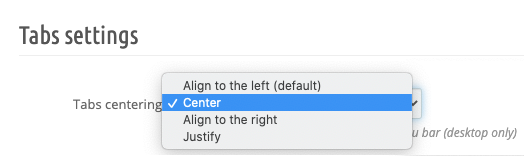
Justify shares the available width between tabs; its result differs from simple centring.
This setting has been available since module version 1.13. If your version does not provide it, check for available updates.