How to offer delivery in pick-up point through Apple Pay?
Apple Pay is compatible with delivery in pick-up point provided that:
- you have a module version higher than or equal to 2.0.0
- you have indicated in the module what are the carriers considered as pick-up points
- your customers use the iOS 15 version or higher
- the Apple Pay order is made through the last step of the order tunnel
Carriers selected as pick-up carriers are not offered when the customer uses the button directly from a product page, product list or cart page. For pick-up point delivery, the customer must select a pick-up point in the standard checkout flow and then pay with the module at the last step.
To tell the module which carriers are considered as pick-up points, go to the "Carriers" tab of the module. The carriers listed are those for which the Apple Pay payment method has been activated via the payment preferences in your back office under the heading "Carrier Restrictions" (so make sure, in a first step, you have activated Apple Pay for "pick-up point" type carriers).
Check only the carriers that correspond to pick-up points, then save. This list identifies their type; Apple Pay permissions are managed in the payment preferences.
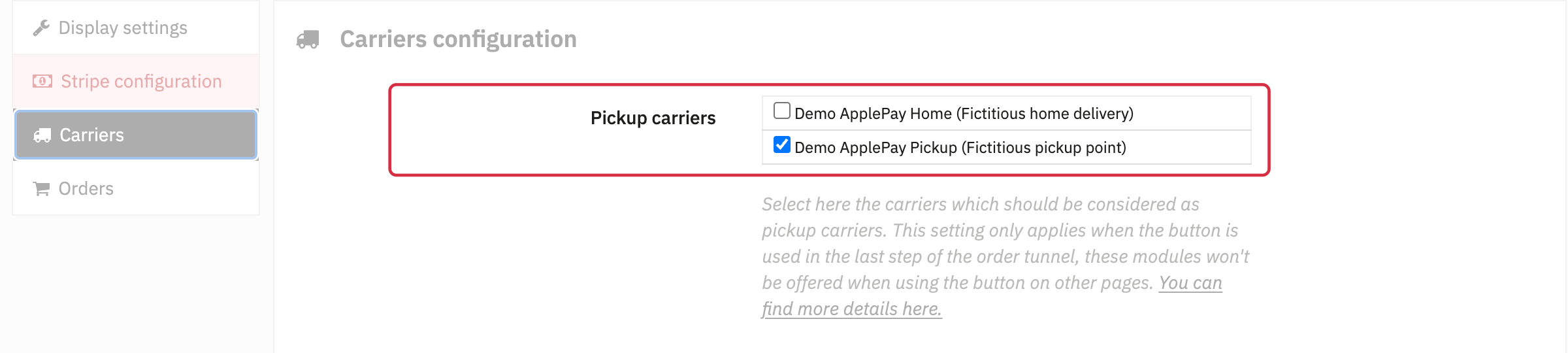
Fictitious example: both carriers are allowed for Apple Pay; only “Demo ApplePay Pickup” is classified as a pickup carrier.
The module takes the delivery address stored on the cart and displays it in the Apple Pay window as a read-only pick-up address. Check that your delivery module passes the actual pick-up point address to the cart: checking a carrier here does not let the customer select a pick-up point or turn a personal address into a pick-up address.
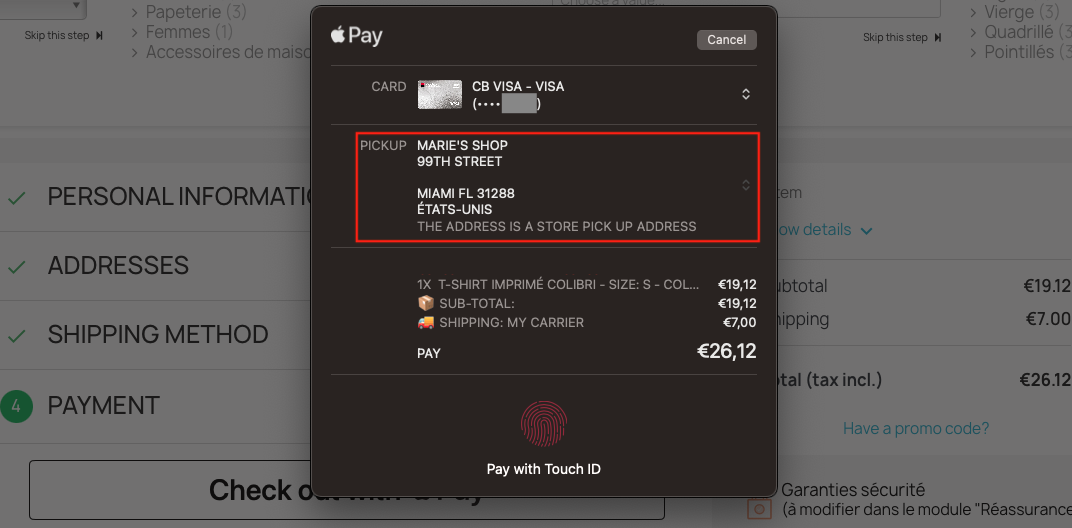
Example on Mac: the layout and labels in the Apple Pay window vary by device and software version.