Can a pack be associated with multiple stores? (multi-store mode)
Since module version 5.4.0, you can associate a pack with several stores on PrestaShop 8.1 and later. Multistore must be enabled in PrestaShop and several stores must be configured.
On PrestaShop 8.1 and 8.2
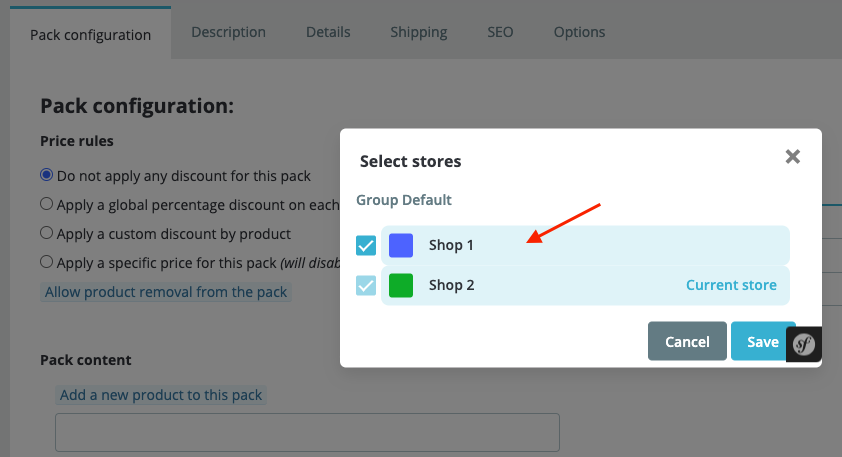
In the module configuration, enable “Allow multishop for packs”. Then associate the pack with the required stores from its product page, as for a standard product.
The following illustration shows the store selection on the PrestaShop 8 product page:
On PrestaShop 9
The module option is no longer displayed: multistore is taken into account automatically when it is enabled in PrestaShop and several stores are configured. Associate the pack with the required stores from its product page; there is no additional module switch to enable.
First open the pack sheet in a specific store context: the product sheet cannot be opened in the “All stores” context. Then use “Select stores” in the multistore header to choose the associations and save. The components and their combinations must also be available in the relevant stores.
Associating a pack with several stores does not by itself create shared stock. Stock sharing depends on the store group configured in PrestaShop: stores in a group with stock sharing use the same component stock, while stores without that sharing keep separate stocks.
Requirements and product page
- Multistore support requires PrestaShop 8.1.0 or a later version compatible with the module. We do not provide support for this option on earlier PrestaShop versions or carry out work to make it compatible.
- Work in the multistore context appropriate for the required associations.
On PrestaShop 8.1.x, we recommend the new product page. To enable it, open Advanced Parameters → New & Experimental features → New features and enable “New product page”. On PrestaShop 9, the legacy product page has been removed.
Other FAQs in this category
- How to avoid a long loading time when updating a pack or a product contained in one or more packs?
- How do I create a bundle containing several units of the same product?
- How do I configure pack pages and related pack displays?
- How do I create a pack and set its price?
- How to migrate my Advanced Pack data to a new PrestaShop installation?