What is the list of cookies deleted when consent is revoked?
When a visitor revokes consent using the link provided on your shop, Advanced Cookie Banner resets their choice and attempts to delete the cookies listed below, along with any cookies you have added in the configuration.
Deletion depends on the cookies' domains and paths: this list does not guarantee that all cookies belonging to third-party services will be removed. See the details at the end of this FAQ.
Cookies deleted by default
"1p_jar",
"ABTasty",
"ABTastySession",
"AWSALB",
"AWSALBCORS",
"BACKENDID",
"FACIL_ITI_LS",
"FLC",
"GEUP",
"OptanonConsent",
"PREF",
"UID",
"UIDR",
"VISITOR_INFO1_LIVE",
"Wysistat",
"YSC",
"__asc",
"__atuvc",
"__atuvs",
"__auc",
"__cfduid",
"__da-pu-xflirt-ID-pc-o169",
"__gads",
"__hssc",
"__hssrc",
"__hstc",
"__qca",
"__ss",
"__ss_referrer",
"__ss_tk",
"__unam",
"__utma",
"__utmb",
"__utmc",
"__utmt",
"__utmt_Shareaholic%20Pageviews",
"__utmt_Tools",
"__utmt_player",
"__utmv",
"__utmz",
"__vrf",
"__vrid",
"__vrl",
"__vrm",
"__vru",
"__vry",
"__vrz",
"__zlcid",
"__zprivacy",
"_comm_playlist",
"_cs_c",
"_cs_ex",
"_cs_id",
"_cs_optout",
"_cs_s",
"_cs_vars",
"_drt_",
"_eventqueue",
"_first_pageview",
"_ga",
"_gat",
"_gat_UA-65072040-17",
"_gid",
"_hjAbsoluteSessionInProgress",
"_hjDonePolls",
"_hjDoneSurveys",
"_hjDoneTestersWidgets",
"_hjIncludeInPageviewSample",
"_hjIncludedInSample",
"_hjMinimizedPolls",
"_hjMinimizedTestersWidgets",
"_hjShownFeedbackMessage",
"_hjid",
"_jsuid",
"_p_hfp_client_id",
"_pk_cvar",
"_pk_hsr",
"_pk_id",
"_pk_ref",
"_pk_ses",
"_pk_uid",
"_referrer_og",
"_sp_id.32f5",
"_sp_ses.32f5",
"_uetmsclkid",
"_uetsid",
"_uetvid",
"_utm_og",
"_ym_d",
"_ym_debug",
"_ym_hostIndex",
"_ym_isad",
"_ym_metrika_enabled",
"_ym_mp2_substs",
"_ym_mp2_track",
"_ym_uid",
"acs",
"ajs_anonymous_id",
"ajs_group_id",
"ajs_user_id",
"anj",
"apisid",
"atidvisitor",
"atredir",
"atreman",
"atsession",
"attvtreman",
"attvtsession",
"c_user",
"check",
"clicky_olark",
"clid",
"client_id",
"cluid",
"csrftoken",
"datr",
"dmvk",
"dpr",
"ds_usr_id",
"eqy_company",
"eqy_sessionid",
"eqy_siteid",
"exchange_uid",
"fc",
"fr",
"gq_utm",
"hist",
"hjClosedSurveyInvites",
"hsid",
"hubspotutk",
"icu",
"id",
"ig_cb",
"ig_did",
"incap_ses_",
"intercom-id-erbfalba",
"intercom-session-erbfalba",
"ipinfo",
"iutk",
"kbntrk",
"koitk",
"lang",
"mc",
"mid",
"mtc_id",
"mtc_sid",
"nid",
"nlbi_",
"piwik_ignore",
"player",
"rds",
"reg_ext_ref",
"reg_fb_gate",
"reg_fb_ref",
"rrs",
"rur",
"rv",
"s_cc",
"s_ecid",
"s_fid",
"s_sq",
"s_vi",
"sapisid",
"sb",
"sc_anonymous_id",
"sc_is_visitor_unique",
"sclocale",
"sess",
"session_id",
"sessionid",
"shbid",
"shbts",
"sid",
"sidcc",
"sp_ab",
"sp_landing",
"sp_landingref",
"sp_m",
"sp_t",
"sp_usid",
"spot",
"ssid",
"ssupp.vid",
"ssupp.visits",
"trackalyzer",
"ts",
"uid",
"uids",
"usersync",
"uslk_e",
"uslk_s",
"usst",
"uuid2",
"v1st",
"visid_incap_",
"visitor_id",
"visitor_v2",
"vuid",
"wd",
"wooTracker",
"x-src",
"xs",
"yabs-sid",
"yandexuid",
How can I add cookies to remove?
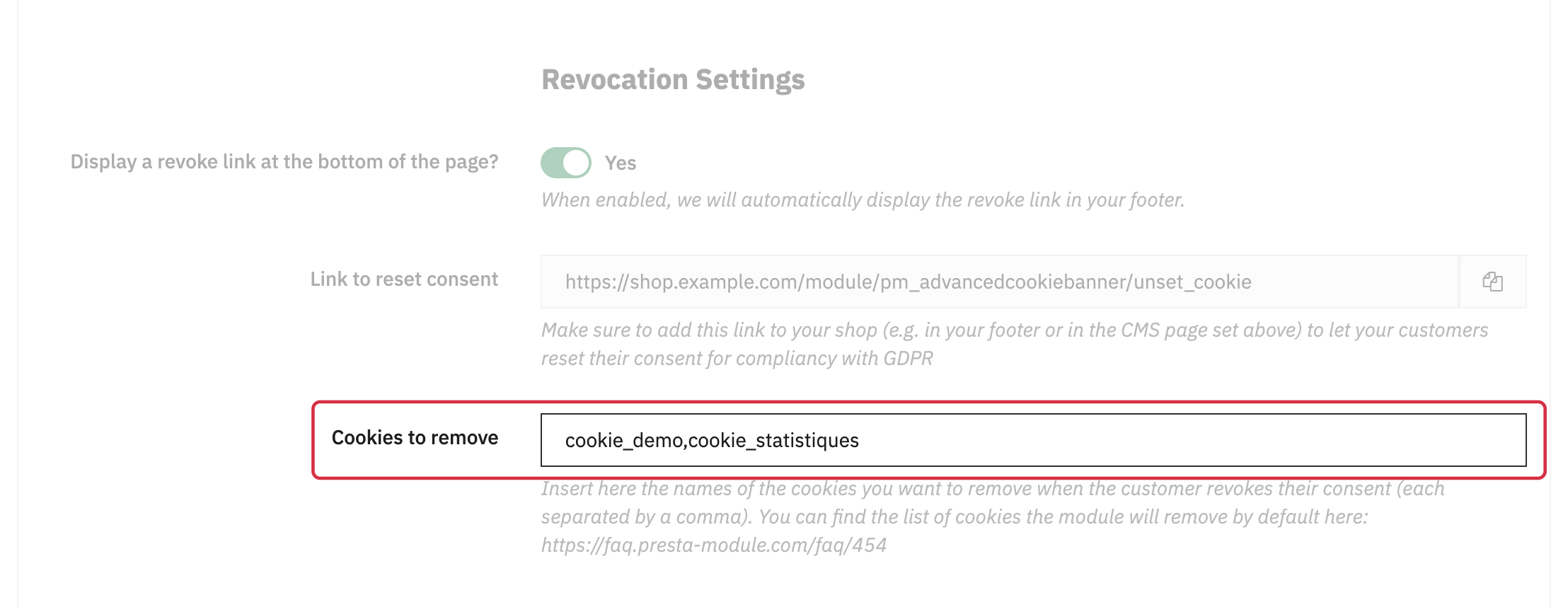
- Open the module configuration, then the Settings tab.
- In the Cookies to remove field, enter the exact cookie names you want to add, separated by commas. Do not enter module names.
- Save the configuration.
Example for two additional cookies: my_analytics_cookie,my_marketing_cookie. Replace these example names with the actual names used on your shop. You do not need to add names already included in the default list.
Names are matched in full: a prefix or a wildcard such as my_cookie_* does not select multiple cookies. If a name contains a variable identifier, enter the exact name of the relevant cookie.
What are the limitations of cookie deletion?
- The module processes cookies sent to your shop by the browser whose names appear in the default list or your additional list.
- It attempts to delete them for the domains and paths handled by the shop. A cookie associated with another domain, particularly a third-party service's domain, cannot be deleted directly by your shop.
- Adding a cookie to this list does not block the script that sets it. To prevent it from being set again without consent, also configure the blocking of the relevant modules. Scripts integrated directly into your theme require appropriate handling.
To configure blocking, see Which modules should I block? and Which cookies are blocked by the module?
After configuration, test consent revocation on your shop and check in your browser that the relevant cookies have been removed.