How can I let visitors withdraw their consent?
Advanced Cookie Banner provides a link allowing visitors to withdraw consent and make a new choice on your shop. You can offer it in the customer account, in the footer or at another location of your choice.
In the customer account
The module automatically adds a consent revocation link to the customer account when a choice is stored in the browser. Logged-in visitors can use it to reset their choice.
In the footer for visitors who are not logged in
- Open the module configuration, then the Settings tab.
- In the revocation settings, enable the option to display the consent revocation link in the footer.
- Save the settings.
The link is displayed for visitors who are not logged in when a choice is stored in their browser. For logged-in customers, the link is in the customer account. If the expected link does not appear, also check the module's theme integration; see the display checks.
On your cookie policy page or elsewhere
- In the same tab, find the Link to reset consent field.
- Copy the address provided by the module using the copy button.
- Add a link to this address on your cookie policy CMS page, in your custom footer or at another suitable location, with a clear label such as Withdraw my cookie consent.
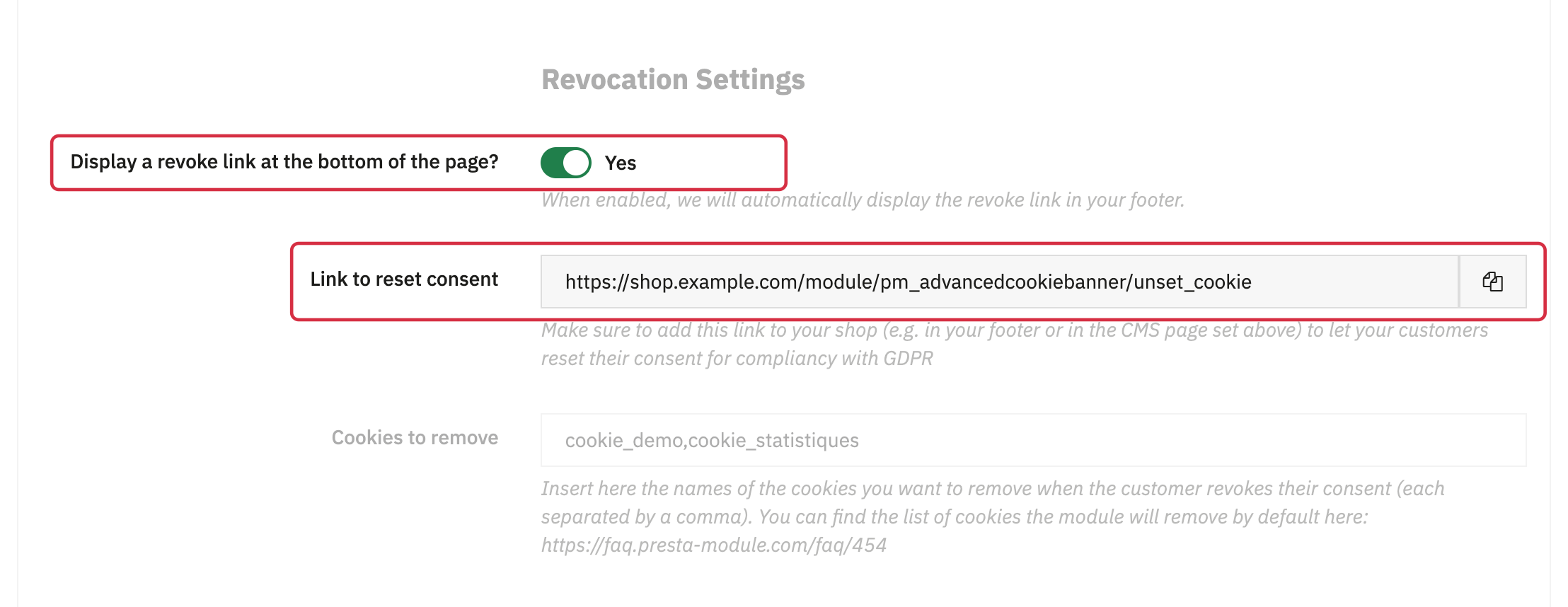
Use the address generated on the relevant shop rather than a URL copied from another shop. To link the CMS page from the banner, see the banner text and CMS page settings.
What happens after consent is withdrawn?
The module deletes the cookie storing the choice, attempts to delete the cookies in its removal list, then redirects the visitor to a shop page. The banner can then be offered again under its usual display conditions. Modules requiring consent are blocked again until they are authorized.
Deletion limitations and additional cookies are covered in the list of cookies deleted when consent is revoked.
To check your configuration: test withdrawal after saving a choice, once as a logged-in customer and once as a visitor who is not logged in.